Guide to geocoding software to find the right fit
Businesses that rely on location data face challenges with accuracy, efficiency, and integrating multiple data sources. Geocoding software addresses these issues head-on. The right geocoder can clean messy address data and deliver results through a scalable API that fits into your existing tech stack.
Let’s take a closer look at how geocoding works and compare the leading geocoder platforms available today.
What is geocoding?
Geocoding converts a physical address into precise geographic coordinates. This process transforms written location data into latitude and longitude coordinates used for navigation and spatial analysis. This capability powers many tools that rely on accurate mapping and location-based services.
Geographic information systems (GIS) play a critical role in working with geocoded data. These platforms store and manage spatial data so businesses can visualize geocoded locations. Meanwhile, global positioning system (GPS) devices like smartphones and vehicle navigation systems capture real-time location data. Together, these technologies help organizations use geocoded data more effectively across many industries.
Most modern tools deliver geocoding through an API that validates inputs and returns standardized geographic coordinates in real-time. Depending on your needs, you can geocode in one of two ways:
- Single geocoding: Processes one address at a time. It’s often used for real-time lookups like when a customer enters an address during checkout. The system sends that information to a geocoding API that instantly returns the corresponding latitude and longitude. This works best for live applications and on-demand location validation.
- Batch geocoding: Processes large volumes of addresses in one job instead of sending individual requests. You upload a dataset — sometimes thousands or millions of records — and receive a fully geocoded file. Companies use batch geocoding to standardize databases, enrich CRM records, and prepare large datasets for analysis.
Reverse geocoding works in the opposite direction. Rather than mapping an address into geographic coordinates, it takes latitude and longitude and returns a readable address. Many apps use this feature to show a street address based on a user’s GPS location.
What is geocoding software used for?
While geocoding software has all sorts of advantages, its main benefits include:
- Converts physical addresses into precise coordinates: Geocoding transforms a written address into exact geographic coordinates. These latitude and longitude values help organizations understand where customers, assets, or events are located. It also improves the quality of location-based decisions.
- Enables accurate location plotting and visualization: Geocoded data allows precise plotting on digital maps and dashboards. Teams can view patterns, measure coverage, and identify gaps in service areas.
- Supports location-dependent services like delivery and logistics: Organizations rely on geocoding to validate addresses and calculate routes. Delivery companies, rideshare apps, and e-commerce brands use these tools to ensure accurate, timely drop-offs and improve customer experience.
- Improves data accuracy for advertising and urban planning: Geocoded data reduces errors and eliminates duplicates by standardizing address formats. Marketers use this information for geo-targeted campaigns, while city planners use it to guide infrastructure and development decisions.
How geocoding software works
Geocoding software takes an address and turns it into location data in just five steps:
- Address input: The process starts when a user or system submits an address. This can happen through a form, a bulk upload of geospatial data, or a real-time API request.
- Address parsing: The geocoder breaks the address into structured components — like street numbers and postal codes — to standardize inconsistent or incomplete inputs.
- Data matching: The system compares the parsed addresses to a reference database of known locations. It searches for the closest match using spatial data maintained within mapping and GIS software.
- Coordinate generation: When the software finds a match, it returns the corresponding latitude and longitude values to pinpoint the location on a map.
- Usable output: The system outputs the geocoded result, which typically includes formatted address details, confidence scores, and other metadata used in analysis.
5 best geocoder platforms to transform address data
If you work with location data, choosing the right geocoder service or geolocation software is a must. The following leading platforms help convert addresses into coordinates and apply location intelligence in everyday operations.
Felt
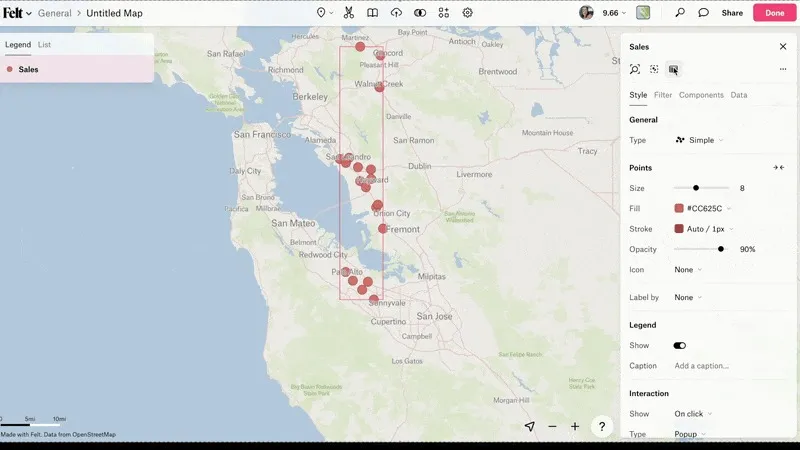
Felt automatically geocodes your addresses as soon as you upload them. You see your data on the map right away — no extra steps or manual input required. You can then use the geocoded data to create detailed, interactive maps ready for analysis and collaboration.
By integrating geocoding directly into the GIS experience rather than offering it as a standalone service, Felt provides a true end-to-end mapping workflow. You can upload your data, see it mapped instantly, and move straight to analysis and collaboration — all in one place.
- Features: Automatic geocoding, interactive map building, AI-powered spatial analysis, cloud database connections for geocoding at scale, Python SDK / QGIS plugin for developers and analysts who geocode programmatically
- Pricing: Free enterprise trial with access to everything Felt Enterprise offers to help you decide what you need for your team
- Payment: Credit card subscription. Enterprise: free to start; Enterprise via annual contract.
Start building maps and analyzing spatial data with Felt’s free tier.
Google Maps Geocoding
Google Maps Geocoding API is one of the most widely used geocoders. In addition to converting addresses and enabling reverse geocoding, it offers seamless integration with Google Maps and extensive coverage across nearly every country. The predictive capabilities and compatibility with Google’s broader mapping and navigation ecosystem make it a solid choice for scalable location intelligence.
- Features: Forward/reverse geocoding, address component filtering, Place ID integration
- Pricing: Pay-as-you-go model, pricing determined per 1,000 requests
- Payment: Credit card billing via Google Cloud account
QGIS Geocoding Plugins
QGIS, an open-source GIS platform, offers multiple geocoding plugins that allow users to process addresses directly within their desktop environment. Plugins like MMQGIS or GeoCoding support batch processing and integration with open datasets. QGIS is especially popular for researchers, urban planners, and analysts who need customizable workflows to visualize patterns and survey spatial data.
- Features: Batch geocoding, support for CSV/Excel imports, mapping within QGIS
- Pricing: Free geocoding API for Windows, Mac, and Linux
- Payment: None, entirely community-supported
Esri Geocoding (ArcGIS Online World Geocoding Service)
Esri’s ArcGIS geocoding service offers high-precision geocoding for enterprise users. It supports single and batch processing, reverse geocoding, and global coverage with address standardization and confidence scoring. Esri integrates geocoding directly into its broader GIS platform for analysis and map building, helping you optimize workflows and share geographic information across your organization.
- Features: Single/batch geocoding, reverse geocoding, worldwide coverage
- Pricing: Custom, high-volume pricing for enterprise usage
- Payment: Credit card or enterprise licensing
Mapbox
Mapbox provides a developer-friendly geocoding API with global coverage and fast processing. It supports forward, reverse, and batch geocoding, but what sets Mapbox apart from the competition is its highly customizable maps and flexible SDKs. These tools let developers tailor map styles and overlays to fit their applications. It integrates geocoded data into rich, interactive map experiences and gives teams control over how location data is used.
- Features: High-performance API, customizable map tiles, forward/reverse geocoding
- Pricing: Free tier includes 100,000 requests/month, paid plans available
- Payment: Credit card or enterprise billing
What’s the difference between free and paid geocoding software?
Choosing between free and paid geocoding software depends on your project size and desired features. The best free geocoding APIs are great for small-scale or experimental projects, while paid solutions offer better precision and advanced tools for professional use.
Here’s a quick comparison:
Choosing the right geocoder service for your needs
No software is perfect, and errors in geocoded addresses are inevitable. But you want a platform that spots these mistakes and protects data accuracy.
Here are other criteria to consider:
- Data volume: Does the software handle single lookups or batch processing?
- Ease of use: Is it a simple drag-and-drop cloud tool?
- Integration: Can it plug into your existing CRM and GIS software?
- Scalability: Will it grow with your business as you scale up?
- Error handling: Does it flag uncertain data and provide accuracy scores?
- Coverage: Can it map geographic coordinates for multiple locations?
Explore cloud-based mapping with Felt
Using geocoding software effectively helps organizations turn complex location data into actionable insights and uncover opportunities that manual processes might miss. A cloud-based platform makes this even easier by handling the heavy lifting behind the scenes.
Felt takes this a step further by combining geocoding with an AI-native, collaborative GIS platform so you don’t need a separate geocoding service. As you upload files or connect data sources, Felt automatically geocodes addresses in the background, giving you ready-to-use latitude and longitude coordinates for spatial analysis.
Watch our recent webinar to see how top teams are ditching legacy GIS tools and moving faster with AI-powered platforms like Felt.
Compare Felt using AI



.webp)